How to create a Gmail App Password
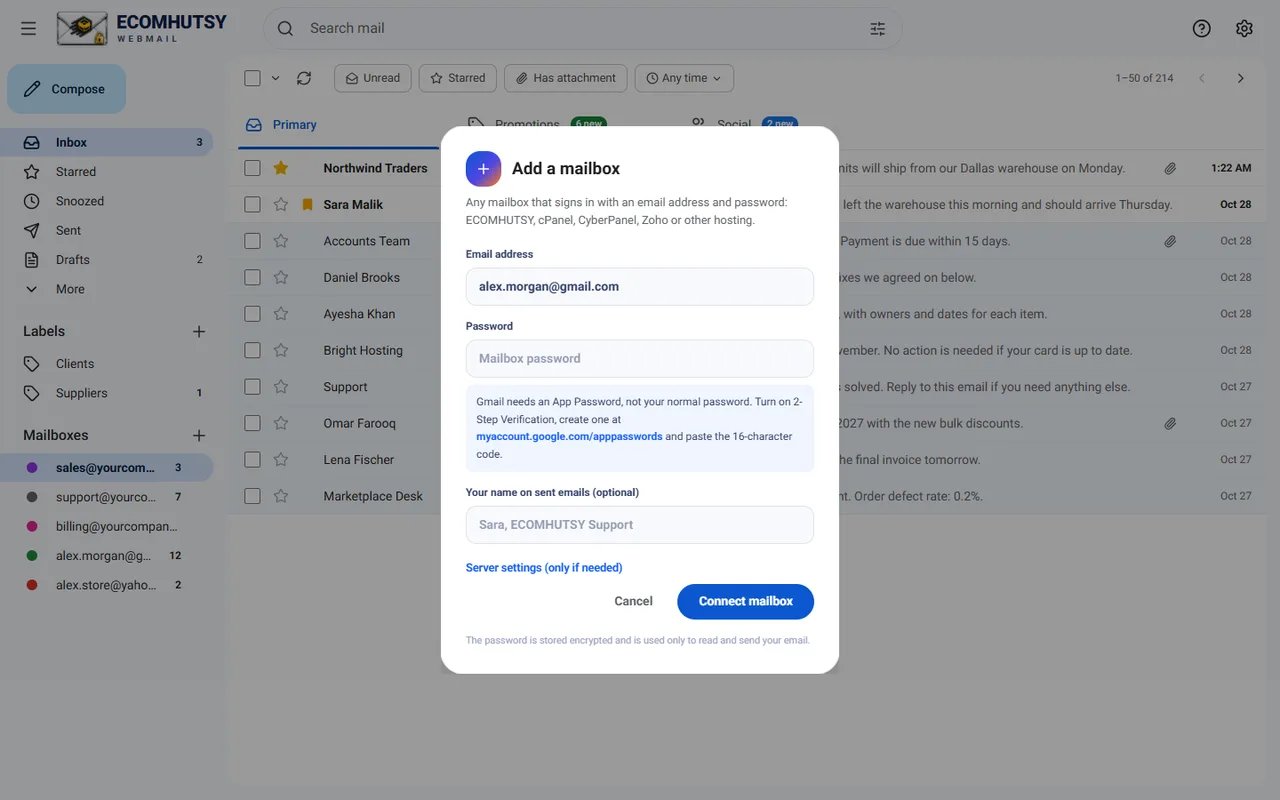
Google does not let other apps use your normal password. An App Password is the safe way in.
- Turn on 2-Step VerificationIn your Google Account, open Security and turn on 2-Step Verification if it is off.
- Open App PasswordsGo to myaccount.google.com/apppasswords.
- Create oneType a name such as ECOMHUTSY Webmail and tap Create.
- Copy the 16-character codeUse it as the password when you sign in to ECOMHUTSY Webmail. Spaces do not matter.
Good to know
- The App Password only works for email apps. It cannot sign in to your Google account.
- You can delete it at any time in the same place. The app then stops connecting.
- Google Workspace: if App Passwords are missing, your administrator has turned them off. Ask them to allow it.
- Yahoo Mail works the same way: see how to create a Yahoo app password.
Gmail IMAP and SMTP settings
| Incoming (IMAP) | imap.gmail.com, port 993, SSL |
| Outgoing (SMTP) | smtp.gmail.com, port 465 (SSL) or 587 (STARTTLS) |
| User name | Your full Gmail address |
| Password | The 16-character App Password |
ECOMHUTSY Webmail fills these in for you when you type a Gmail address.
Questions and answers
Why does my normal Gmail password not work?
Google blocks normal passwords in third-party apps for security. App Passwords were made for exactly this.
E-commerce solutions from the makers of this app
Products



Services




Your business email, in a clean app
Free · no ads in your inbox · mail goes straight from your phone to your mail server